








The best Hotjar alternatives & competitors, compared


Contents
For years, Hotjar was synonymous with session replay. It was the tool that made watching real users interact with your site accessible to everyone – engineers, designers, marketers, and founders alike.
But the landscape has changed; session replay is no longer a standalone category – it's become a core feature of broader analytics and developer platforms. Tools like PostHog, Pendo, and Sprig now bundle replays alongside product analytics, feature flags, A/B testing, and more.
Whether you're here because you've outgrown what Hotjar offers or because you want session replay as part of a more complete toolkit, here are the best alternatives.
1. PostHog
- Founded: 2020
- Similar to: Hotjar, Pendo, Crazy Egg
- Typical users: Engineers and product teams
- Typical customers: Mid-size B2B/B2C companies and startups


What is PostHog?
PostHog (that's us 👋) is an all-in-one platform for session replay, heatmaps, user surveys, product and web analytics, feature flags, A/B testing, error tracking, and more – everything you need to understand your users.
This means it's not just an alternative to Hotjar, but also tools like Mixpanel, Sentry, and LaunchDarkly.
Typical PostHog users are engineers and product managers at startups, scaleups, and mid-size companies, such as ElevenLabs, Supabase, and Lovable.
Key features
- Session replays: Including event timelines, console logs, DOM explorer, network activity. Combine with error tracking to debug issues faster.
- Heatmaps: Visualize user and rage clicks anywhere on your site, along with scroll depth and clickmaps.
- Product analytics: Analyze funnels, user paths, retention, and trends. Write your own custom queries with SQL.
- Feature flags & A/B testing: Rollout features safely, run multivariate A/B tests.
- Surveys: Run custom, targeted, multi-step surveys or use our pre-built customer satisfaction, NPS, and PMF ones.
- Error tracking: Monitor exceptions, connect errors to session replays and feature flag changes.
How does PostHog compare to Hotjar?
Hotjar (now part of Contentsquare) is great for web session replays, heatmaps, and surveys, but users often rely on other tools for analytics and more. PostHog can replace them all and has a generous free tier of 5,000 sessions and 1 million analytics events per month.
PostHog also provides session replays and surveys for mobile apps – with native SDKs for iOS, Android, React Native, and Flutter – making it a great option if you need a Hotjar-style tool for mobile apps. Contentsquare's mobile replay, by comparison, is limited to Enterprise plans.
Main differences between PostHog and Hotjar
- PostHog includes product analytics with funnels, retention, user paths, and SQL access; Hotjar doesn't offer product analytics natively, but it's available on the full Contentsquare platform as a separate product (Heap).
- PostHog includes error tracking tied to session replays; Hotjar has basic error detection but no full error tracking.
- PostHog offers mobile session replays and surveys on all plans; Contentsquare's mobile replay is limited to Enterprise plans.
- Hotjar includes user interviews and usability tests; PostHog does not.
Main similarities between PostHog and Hotjar
- Both offer session replay for watching real user sessions on the web.
- Both include heatmaps for visualizing clicks and scroll depth.
- Both offer surveys for collecting in-app feedback, NPS, and CSAT scores.
- Both have free tiers that don't require a credit card to get started.
- Both support rage click detection to identify user frustration.
- Both are GDPR and SOC 2 compliant.
Why do companies use PostHog?
According to reviews on G2, companies use PostHog because:
It replaces multiple tools: PostHog can replace Hotjar (session replay & surveys), Google Analytics, GrowthBook (feature flags and A/B testing), and more. This simplifies workflows and ensures all their data is in one place.
Pricing is transparent and scalable: Reviewers appreciate how PostHog's pricing scales as they grow. There's a generous free tier. Companies eligible for PostHog for Startups also get an additional $50k in credits.
They need a complete picture of users: PostHog includes every tool necessary to understand users and improve products. This means creating funnels to track conversion, watching replays to see where users get stuck, testing solutions with A/B tests, tracking errors, and gathering feedback with user surveys.
Bottom line
PostHog is a broader, more powerful tool than Hotjar. This means more tools and mobile support, but this comes with some extra complexity. The payoff is all your user data in one place and tightly integrated with powerful analytical tools.
It also has a generous free tier for each of its products including 5,000 replays, 1 million events, and 1,500 survey responses per month.
2. Mouseflow
- Founded: 2009
- Most similar to: Hotjar
- Typical users: Marketing and UX teams
- Typical customers: SMB and enterprises in retail
What is Mouseflow?
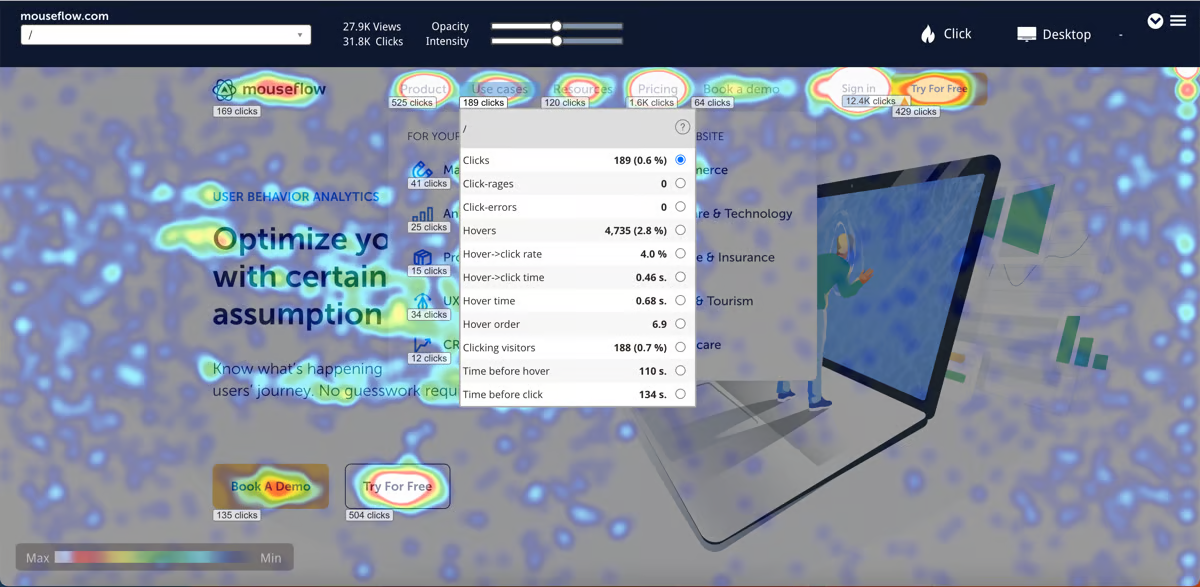
Mouseflow is a behavioral analytics tool that offers session replays, heatmaps, and basic funnel analysis. It's designed mainly for marketing and e-commerce websites. It's very similar to Hotjar, making it a direct rip and replace solution.
According to data from BuiltWith, 5,897 of the top 1 million websites use Mouseflow (correct as of August 2025), considerably less than Hotjar's 74,141.
Key features
- Session replay: Watch user sessions to learn what helps and hurts.
- Friction scores: Identify sessions where users experience frustration.
- Heatmaps: See where users click and scroll on your website.
- User feedback: Gather feedback and ratings from users.
- Form analytics: Reduce abandonment on signup forms.
How does Mouseflow compare to Hotjar?
Mouseflow is more or less a like-for-like replacement for Hotjar. If you're unhappy with Hotjar but don't want a more advanced product like PostHog, Mouseflow is an obvious alternative.
Main differences between Mouseflow and Hotjar
- Mouseflow includes built-in form analytics for tracking field-level abandonment; Hotjar does not have dedicated form analytics.
- Mouseflow offers friction scores to automatically surface frustrating sessions; Hotjar relies on rage click detection.
- Hotjar includes user interviews and usability testing; Mouseflow does not.
- Mouseflow supports six types of heatmaps (click, move, scroll, attention, geo, live); Hotjar offers click, move, and scroll maps.
Main similarities between Mouseflow and Hotjar
- Both offer session replay for watching real user sessions on the web.
- Both include heatmaps for visualizing clicks and scroll depth.
- Both offer surveys and feedback widgets for collecting user opinions.
- Both are designed for non-technical marketing and UX teams.
- Both offer free tiers with limited session counts.
Why do companies use Mouseflow?
Based on reviews from G2, customers use Mouseflow because:
They want to understand user behavior: Session replays and heatmaps help them see what actions users take, which areas of the website receive the most attention, and how they can improve the user experience to increase conversions.
To save time on user interviews: Using replays and surveys together enables users to gather information more efficiently compared to running user interviews.
They need something simple: Mouseflow offers basic analytical tools and autocaptures frontend events, which makes it easy for anyone to set up and unearth insights.
Bottom line
Mouseflow is a good alternative to Hotjar for companies who just want a similar tool with slight differences in execution and pricing.
If you're looking for more functionality or mobile support, you'll need to look elsewhere.
3. Sprig
- Founded: 2017
- Most similar to: Hotjar
- Typical users: Product teams and UX researchers
- Typical customers: Medium and large B2C and B2B products
What is Sprig?
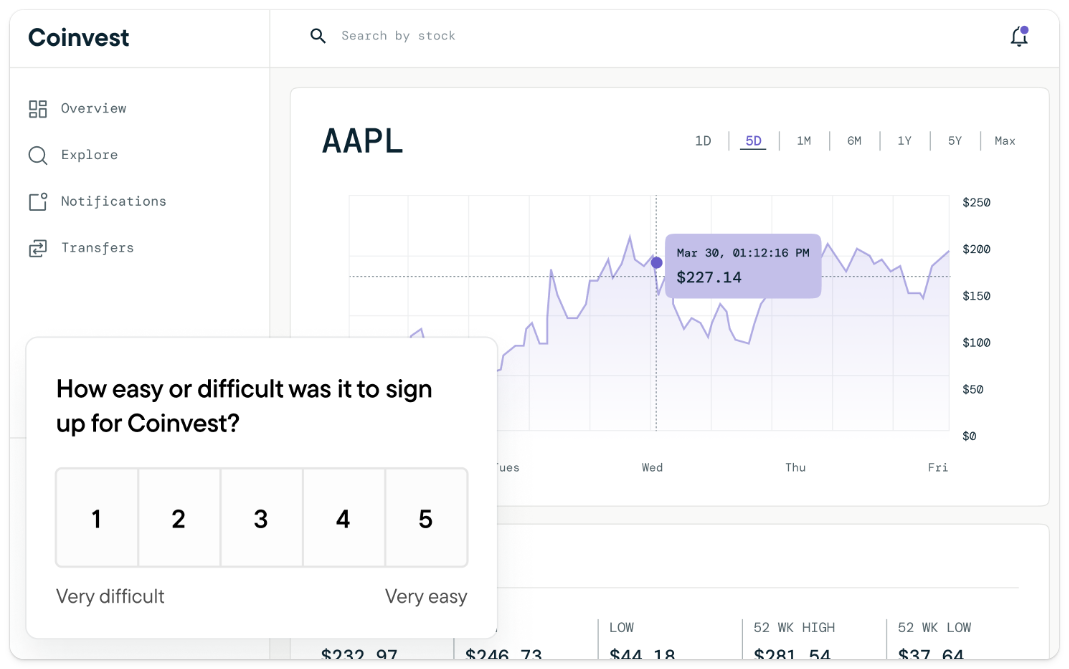
Sprig is a user insights tool that combines surveys, session replays, and heatmaps with AI analysis. Sprig works slightly differently than other tools as it links surveys and session replays together in what it calls studies, normally triggered by specific user events. It doesn't do funnel analysis or other basic analytics, focusing solely on in-product user research.
It's used by large, B2C companies such as PayPal, Coinbase, and Robinhood.
Key features
- Surveys: Run targeted surveys right in your product and capture real-time insights.
- Session replay: Capture targeted user journey clips to see what's working.
- Heatmaps: Get a visual representation of your users' in-product interactions.
- AI analysis: Surface product issues and opportunities in real time.
How does Sprig compare to Hotjar?
Sprig is a decent replacement for Hotjar, especially if you find Hotjar's survey tools lacking. Its support for mobile apps (minus Flutter) is a key differentiator.
Sprig now offers three bundles (Research Core, Digital Experience, Digital Behavior), each starting with a limited free plan. Exact pricing for paid tiers requires a demo.
Main differences between Sprig and Hotjar
- Sprig supports mobile app surveys and replays (iOS, Android, React Native); Hotjar/Contentsquare's mobile replay is Enterprise-only.
- Sprig focuses on event-triggered research studies; Hotjar captures all sessions broadly.
- Hotjar includes user interviews and usability testing; Sprig focuses on automated surveys and replay-based insights.
- Hotjar has transparent pricing with a generous free tier; Sprig's paid pricing requires a demo.
- Hotjar offers zone-based heatmaps with revenue attribution; Sprig has standard heatmaps.
Main similarities between Sprig and Hotjar
- Both offer session replay for watching real user sessions.
- Both include heatmaps for visualizing user interactions on pages.
- Both offer surveys for collecting in-app feedback and NPS scores.
- Both provide free tiers to get started.
- Both target product and UX teams looking for qualitative insights.
- Both are closed-source, cloud-only platforms.
Why do companies use Sprig?
According to reviews on G2, customers choose Sprig because:
It gives them real-time feedback: Sprig makes it easy for product teams to engage with users while they were actively using the product. This real-time feedback helps them make informed decisions, iterate features faster, and improve the overall user experience.
It's easy to use: Reviewers note how easy Sprig is to set up and use. This means they can go from idea to actionable learnings quickly.
It has pre-built reports and templates: Users like the comprehensive documentation and the fact there are numerous templates they can immediately apply and adapt to their needs.
Bottom line
Sprig is a good option for product teams who want to run surveys and do in-depth analysis on user journeys within products, especially compared to other Hotjar alternatives like Mouseflow that are more focused on e-commerce and small business users.
Their lack of pricing transparency is a negative though.
4. Lucky Orange
- Founded: 2010
- Most similar to: Hotjar
- Typical users: Marketers and consultants
- Typical customers: Small e-commerce businesses and agencies
What is Lucky Orange?
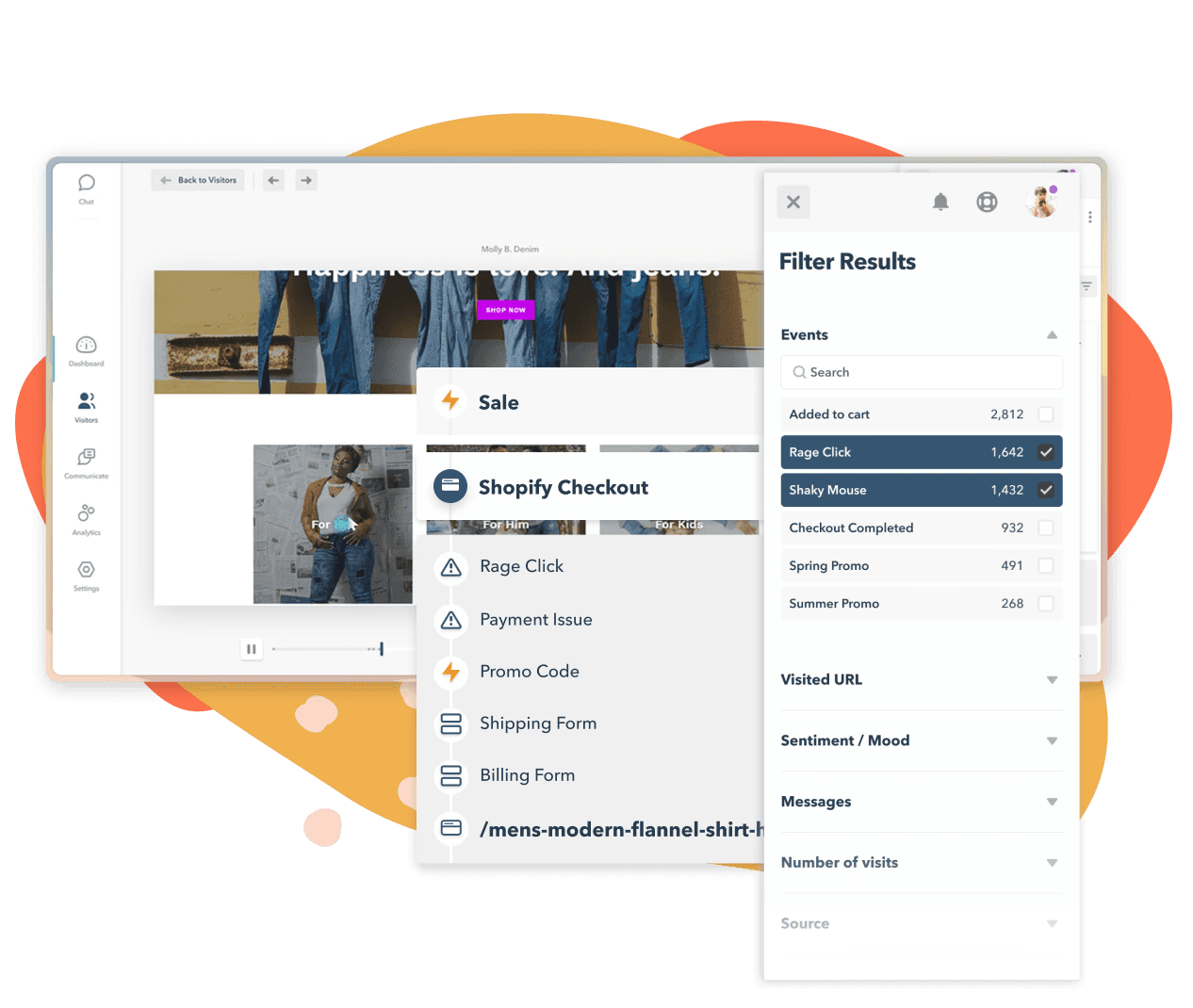
Lucky Orange is a simple analytics tool designed to analyze user behavior on small e-commerce websites using session replays and heatmaps. It also offers built-in form analytics, live chat, surveys, and announcements widgets that are useful for store owners.
Lucky Orange customers are often small online stores or freelance conversion optimization consultants.
Key features
- Session replay: Watch how real users navigate your website.
- Heatmaps: See where users click and scroll to on pages.
- Conversion funnels: Basic funnel analysis for tracking conversions.
- Dashboards: Create simple dashboards using pre-defined reports.
- Visitor profiles: See everything a user has done.
How does Lucky Orange compare to Hotjar?
Lucky Orange is a natural alternative to Hotjar as it covers most of the same features, with some slightly better web analytics capacities.
Main differences between Lucky Orange and Hotjar
- Lucky Orange includes a built-in live chat product for real-time customer support; Hotjar does not.
- Lucky Orange includes form analytics to track field-level abandonment; Hotjar doesn't have dedicated form analytics.
- Lucky Orange includes all features on every plan; Hotjar gates features behind higher tiers.
- Hotjar includes user interviews and usability testing; Lucky Orange does not.
- Hotjar has zone-based heatmaps with revenue attribution; Lucky Orange has standard dynamic heatmaps.
Main similarities between Lucky Orange and Hotjar
- Both offer session replay for watching real user sessions.
- Both include heatmaps for visualizing clicks and scroll depth.
- Both offer surveys and feedback widgets for collecting user opinions.
- Both are web-only tools with no native mobile app support.
- Both are designed for non-technical users and small teams.
💡 Good to know: Although Lucky Orange offers a simple dashboarding feature, it doesn't include campaign or session metrics.
Why do companies use Lucky Orange?
According to reviews on G2, because:
It's easy to use: Lucky Orange has a simple UI compared to popular analytics tools, which makes it easy to analyze user behavior and identify issues with websites.
It helps them improve conversion: Customers are mostly using Lucky Orange to optimize landing pages and e-commerce checkout flows.
It doesn't impact page speed: Users report Lucky Orange has negligible impact on website performance, which they value highly.
Bottom line
Lucky Orange is ideal for small business owners who want actionable insights without much effort, though its streamlined interface may be too limiting for larger teams who want more powerful tools.
It's a good alternative to Hotjar, but doesn't provide features beyond it.
5. Crazy Egg
- Founded: 2006
- Most similar to: Lucky Orange, Mouseflow
- Typical users: Marketers and UX designers
- Typical customers: Small and medium size businesses and agencies
What is Crazy Egg?
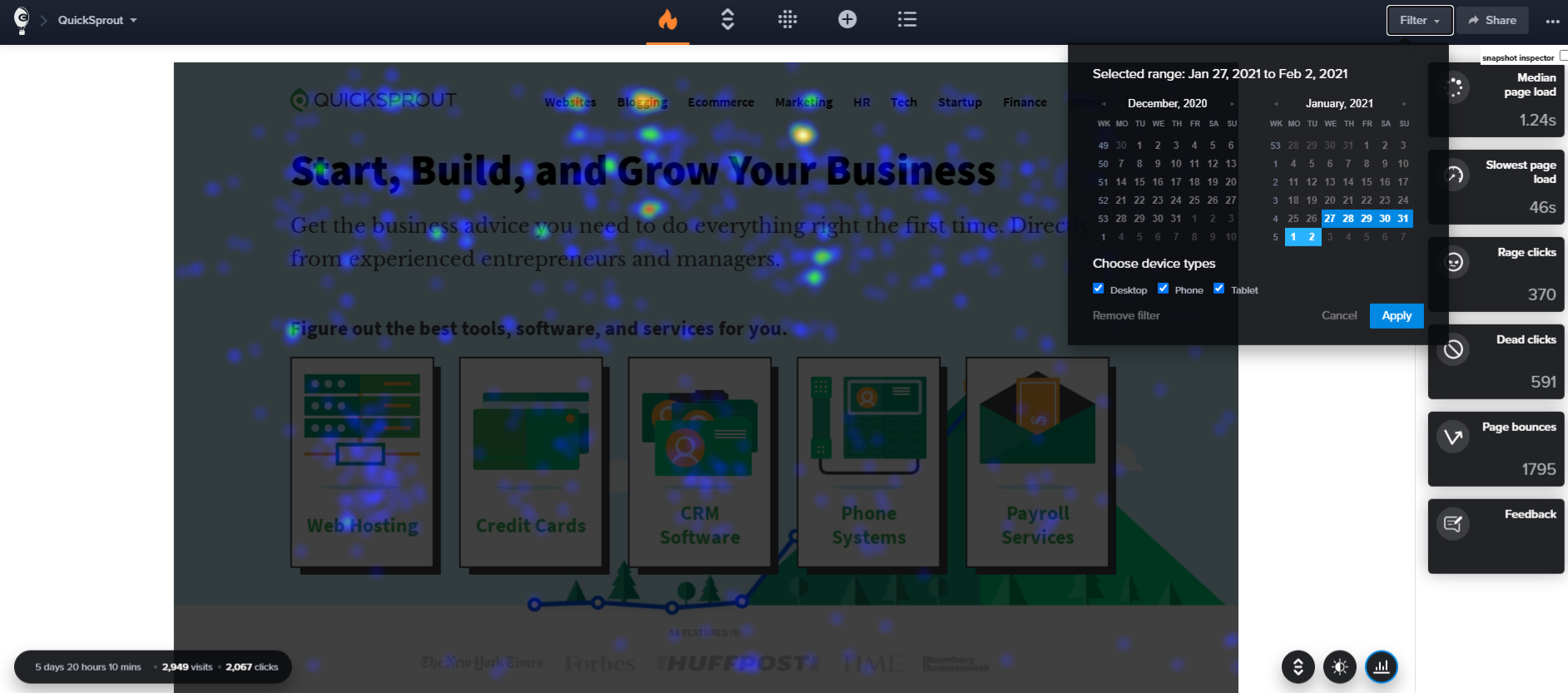
Crazy Egg is a heatmap and optimization platform tool for small business owners and marketers – it's popular among e-commerce businesses who run Shopify stores. It's best for its heatmaps, but it also includes basic replay, A/B testing, and website analytics tools.
It's ideal for nontechnical users who want to optimize their websites and drive conversions.
Key features
- Heatmaps: See where people click and where they don't.
- Session replay: Watch recordings of actual visitors using your website.
- A/B testing: Simple, no-code A/B tests using multi-armed bandit method.
- Surveys: Collect qualitative feedback.
- Error tracking: Find out if errors are preventing your visitors from converting.
How does Crazy Egg compare to Hotjar?
Crazy Egg is very similar to Hotjar. It includes many of the same features and is designed for a similar audience of website owners and marketers.
It does include some additional capacities beyond Hotjar's with web analytics, A/B testing, and error tracking.
Main differences between Crazy Egg and Hotjar
- Crazy Egg includes built-in A/B testing with a no-code editor; Hotjar/Contentsquare does not.
- Crazy Egg includes JavaScript error tracking (on Plus plan and above); Hotjar has basic error detection but no dedicated error tracking.
- Crazy Egg includes basic web analytics and traffic analysis; Hotjar doesn't offer web analytics natively.
- Hotjar includes user interviews and usability testing; Crazy Egg does not.
- Hotjar has a free tier; Crazy Egg only offers a 30-day free trial.
- Crazy Egg requires page-specific setup for heatmaps; Hotjar tracks all pages automatically.
Main similarities between Crazy Egg and Hotjar
- Both offer session replay for watching real user sessions.
- Both include heatmaps for visualizing clicks and scroll depth.
- Both offer surveys for collecting qualitative feedback.
- Both are web-only tools with no native mobile app support.
- Both are designed for non-technical marketing and UX teams.
- Both support Shopify, WordPress, and other popular CMS integrations.
Why do companies use Crazy Egg?
According to reviews on G2, people use Crazy Egg because:
It's easy to setup: Crazy Egg makes it easy integrate with numerous services and content management systems, like Shopify, Wix, and Wordpress. This is especially useful for website owners and agencies who run multiple websites.
They want to improve content and conversions: Crazy Egg's heatmaps and session replay features enable them to gather valuable insights for optimizing their content, increasing conversions, and understanding how users navigate their websites.
Gathering feedback: Users like that they can combine data with the qualitative feedback from users and customer CTAs.
Bottom line
Crazy Egg is a strong alternative to Hotjar, especially if you'd like to run basic A/B tests to help improve conversions, something Hotjar doesn't offer. It doesn't provide mobile support, but does add some features like error tracking and web analytics.
Unfortunately, Crazy Egg doesn't offer a free tier though, only a free trial.
6. Pendo
- Founded: 2013
- Most similar to: PostHog, Sprig
- Typical users: Product managers and customer success teams
- Typical customers: Small and mid-market B2C apps
What is Pendo?
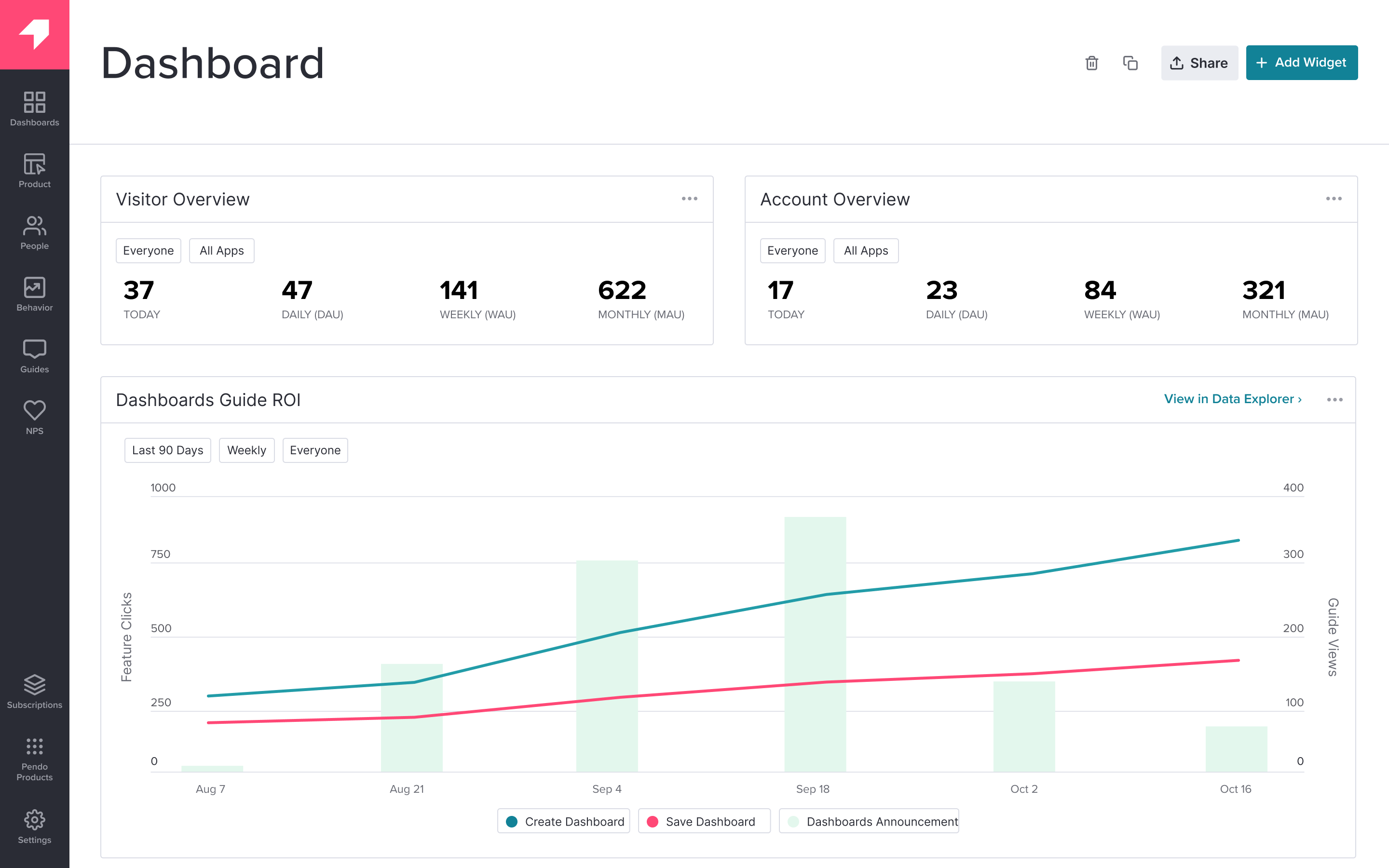
Pendo describes itself as a product experience platform. In addition to session replay and user feedback tools, it offers product analytics, in-app guides, user feedback, and product validation tools. It's mainly used by product managers and customer success teams.
Key features
- Session replay: Watch real users use your product.
- In-app guides: Deliver personalized guidance to customers inside your app.
- User feedback: Capture and analyze customer feedback at scale.
- Product analytics: Funnels, trends, and retention analysis with event autocapture.
- Product validation and roadmaps: Plan product improvements and roadmaps.
How does Pendo compare to Hotjar?
Pendo doesn't offer all the features Hotjar does – it lacks heatmaps and scroll maps, for example. But it does offer more comprehensive product analytics features, making it more useful for app developers.
It's also one of the few options on this list that offers both mobile surveys and mobile session replays (added in late 2025), though replays are a paid add-on.
Main differences between Pendo and Hotjar
- Pendo includes product analytics with funnels, retention, and cohort analysis; Hotjar doesn't offer product analytics natively (it's a Contentsquare add-on).
- Pendo includes in-app guides, tooltips, and onboarding walkthroughs; Hotjar has no in-app adoption tooling.
- Pendo includes roadmap planning and product validation tools (Pendo Listen); Hotjar does not.
- Hotjar includes heatmaps and scroll maps; Pendo does not.
- Hotjar includes user interviews and usability testing; Pendo does not.
- Hotjar has transparent, self-serve pricing with a free tier; Pendo requires sales conversations.
Main similarities between Pendo and Hotjar
- Both offer session replay for watching real user sessions.
- Both include surveys for collecting in-app feedback and NPS scores.
- Both target non-technical users like product managers and designers.
- Both are closed-source, cloud-only platforms.
- Both support web and mobile apps.
- Both are GDPR compliant.
Why do companies use Pendo?
According to G2 reviews, customers use Pendo for:
Customer support and feedback: Users value Pendo as a useful tool for customer support and feedback collection. They use Pendo's feedback features to gather qualitative data and feed that into Pendo's validation and roadmap features.
Improving onboarding: Combining Pendo's in-app guides and analytics features makes it easy for non-technical users to experiment with new onboarding flows and improve user adoption.
Product planning: Customers use Pendo's data tools, product validation, and roadmap features to align internal teams and stakeholders on product development.
Bottom line
Pendo isn't a complete replacement for Hotjar due its lack of heatmaps, but the combination of analytics, session replay, and survey tools makes it useful for product managers, especially those who also need in-app product guides.
Unfortunately, its lack of transparent pricing and no free replays are a negative.
7. Microsoft Clarity
- Founded: 2020
- Most similar to: Hotjar, Mouseflow
- Typical users: Marketing and content teams
- Typical customers: Small businesses
What is Microsoft Clarity?
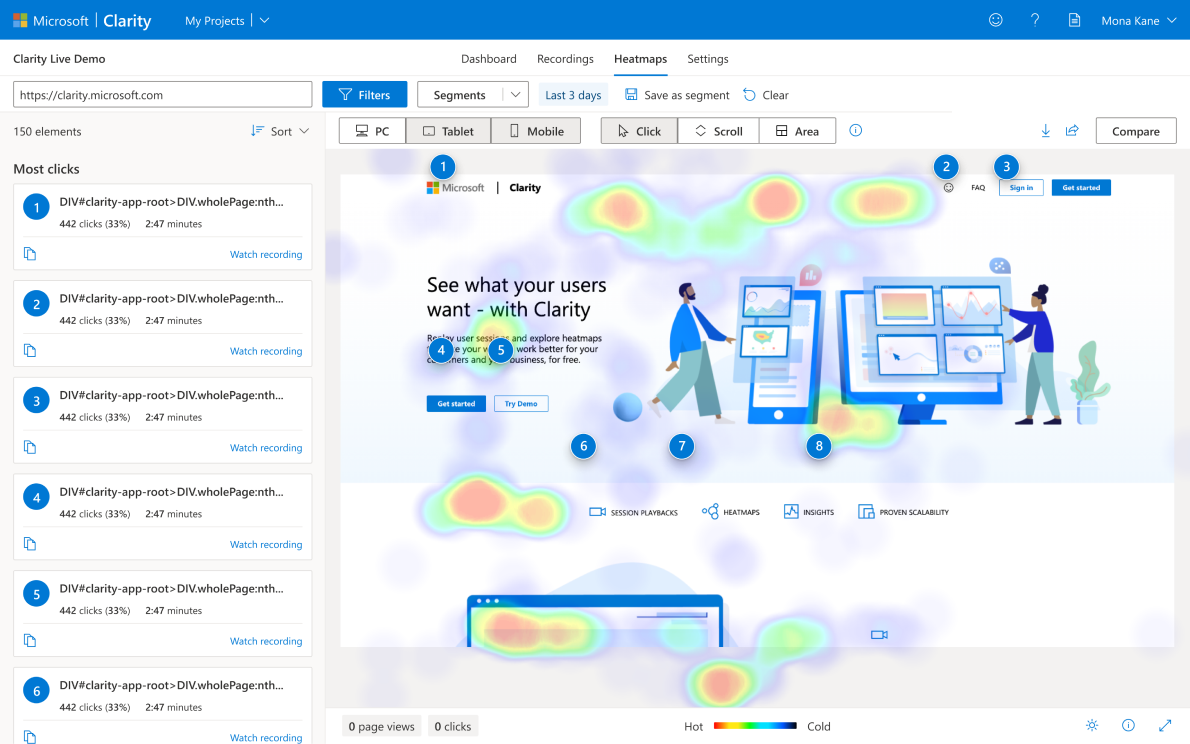
Microsoft Clarity is a 100% free session replay tool that supports basic replay features and heatmaps. It also records rage clicks and dead clicks, and integrates with Google Analytics 4, so you can view your GA data in Clarity.
Unsurprisingly, given it's free, Clarity is very popular.
Key features
- Session replay: Watch user sessions with built-in event timelines
- Heatmaps: See where users click and how they navigate your website
- Scrollmaps: See how far users scroll and where they dwell
- Frustration signals: Detect rage and dead clicks
How does Clarity compare to Hotjar?
Clarity provides a great session replay and heatmap tool to the exclusion of all other features. Some Hotjar users might miss the surveys capabilities though.
It's also free, of course, though it only retains session replay data for 30 days.
Main differences between Clarity and Hotjar
- Clarity is 100% free with unlimited session recordings; Hotjar's free tier is limited and paid plans can be expensive.
- Clarity integrates natively with Google Analytics 4 and Microsoft's Copilot AI; Hotjar does not.
- Hotjar includes surveys, feedback widgets, user interviews, and usability testing; Clarity has none of these.
- Hotjar/Contentsquare has a product analytics add-on (via Heap) and zone-based heatmaps; Clarity has basic heatmaps only.
- Clarity only retains session replay data for 30 days; Hotjar retains data longer depending on plan.
Main similarities between Clarity and Hotjar
- Both offer session replay for watching real user sessions.
- Both include heatmaps for visualizing clicks and scroll depth.
- Both detect rage clicks and frustration signals.
- Both are web-only tools with no native mobile app replay.
- Both are designed for non-technical users.
- Both are GDPR compliant.
Why do companies use Microsoft Clarity?
According to reviews on G2 and Capterra, it's because:
It's easy to set up and use: Setting up Clarity doesn't require much technical knowledge and users mostly like the simple user interface.
It helps uncover how users navigate: Clarity users are mostly using it to understand how people navigate their websites and identify opportunities for improvement.
It's free: The short 30-day retention limit and lack of funnel analysis are easy to forgive when it's free.
Bottom line
Being free forever has made Clarity a very popular alternative to Hotjar. While it has some limitations, it covers most bases for small businesses provided you don't need surveys, feedback, or more advanced analytics features.
Which Hotjar alternative should you choose?
Here's a quick guide based on what you're looking for:
For engineering-led teams wanting an all-in-one platform:
- PostHog – Product analytics, session replay, heatmaps, feature flags, A/B testing, error tracking, surveys, and more in one developer platform. Best if you want to replace multiple tools with transparent pricing and mobile support.
For a like-for-like Hotjar replacement:
- Mouseflow – Session replays, heatmaps, form analytics, and feedback in a similar package. Best for marketing teams who just want a direct swap.
For AI-powered user research:
- Sprig – Combines targeted surveys, session replays, and heatmaps with AI analysis. Best for product and UX teams at B2C companies who want to go beyond Hotjar's qualitative tools.
- PostHog – PostHog AI lets you analyze session replays, survey responses, and analytics data using natural language. Ask questions like "why are users dropping off at checkout?" and get answers grounded in your actual data.
For small e-commerce and Shopify stores:
- Lucky Orange – Replays, heatmaps, surveys, live chat, and form analytics. Best for small business owners who want everything in one simple tool.
- Crazy Egg – Heatmaps, A/B testing, surveys, and error tracking. Best if you want to optimize conversions with built-in testing.
For startups:
- PostHog – A generous free tier (1M events, 5K replays, 1,500 survey responses) plus up to $50k in credits for eligible startups. One platform that scales from MVP to growth stage without needing to swap tools.
- Microsoft Clarity – 100% free replays and heatmaps with no usage limits. A good starting point to pair with a dedicated analytics tool as you grow.
For product managers needing adoption tools:
- Pendo – Product analytics, session replay, in-app guides, and feedback collection. Best if you need onboarding flows and tooltips alongside your analytics.
For an 100% free option:
- Microsoft Clarity – 100% free session replays and heatmaps with unlimited recordings. Best for budget-conscious teams who only need replays and heatmaps.
Is PostHog right for you?
Here's the (short) sales pitch.
We're biased, obviously, but we think PostHog is the perfect Hotjar replacement if:
- You'd like to replace multiple tools with just one.
- You want more powerful analytics than Hotjar can offer.
- You need mobile session replays and surveys (not just web).
- You want to try before you buy (we're self-serve with a generous free tier).
Check out our product pages and read our docs to learn more.
Frequently asked questions
What is Hotjar used for?
Hotjar (now part of Contentsquare) is a behavior analytics tool used by UX designers, product managers, and marketers to understand how users interact with their websites. It provides session replays, heatmaps, surveys, feedback widgets, and user interviews to capture qualitative user data.
Is Hotjar still available?
Not as a standalone product. Hotjar merged into Contentsquare as of July 1, 2025. New customers sign up through Contentsquare, and existing Hotjar customers are being migrated to the Contentsquare platform. The core Hotjar tools (heatmaps, recordings, surveys) still exist within Contentsquare's free tier.
What's the difference between PostHog and Hotjar?
PostHog is an all-in-one developer platform combining product analytics, session replay, heatmaps, feature flags, A/B testing, error tracking, surveys, a data warehousen and more.
Hotjar (now Contentsquare) focuses on qualitative behavior analytics – session replays, heatmaps, surveys, and user interviews. PostHog is built for engineering and product teams who want everything in one place; Hotjar is designed for non-technical UX and marketing teams who want simple visual insights.
How much does Hotjar cost now?
Since merging into Contentsquare, Hotjar's tools are now split across three Contentsquare products (Experience Analytics, Voice of Customer, Product Analytics), each with their own plans (Free, Growth, Pro, Enterprise). Contentsquare Growth starts around $40/month, but Pro and Enterprise pricing requires a sales conversation.
See our PostHog vs Hotjar comparison for a detailed pricing breakdown.
What's the best free Hotjar alternative?
Microsoft Clarity is the best completely free option – it offers unlimited session replays and heatmaps at no cost, though it lacks surveys and analytics.
If you want more of the functionality of Hotjar, PostHog has a generous free tier: 1 million analytics events, 5,000 session replays, 1,500 survey responses, 1 million feature flag requests, and 100,000 error tracking events per month.
Which Hotjar alternative is best for mobile apps?
PostHog is the strongest option for mobile, with session replays and surveys across iOS, Android, React Native, and Flutter on all plans (including free). Sprig also supports mobile surveys and replays on iOS, Android, and React Native. Pendo added mobile replays in late 2025 as a paid add-on. Most other alternatives on this list are web-only.
Which Hotjar alternative has the best heatmaps?
For standard click and scroll heatmaps, most tools on this list perform similarly. Mouseflow stands out with six heatmap types (click, move, scroll, attention, geo, and live). Crazy Egg is known for clean heatmap visualizations and the confetti view.
For developer teams who want heatmaps integrated with analytics, PostHog connects heatmap data to your funnels and user paths.
Which Hotjar alternative is best for startups?
PostHog is the best option for startups. Beyond the generous free tier, startups can apply for PostHog for Startups to get $50,000 in additional credits.
Microsoft Clarity is a good companion if you just want free replays while getting started.
Which Hotjar alternative is best for surveys?
Sprig excels at in-product surveys with AI-powered analysis, targeted delivery, and mobile support. PostHog offers multi-step surveys with behavioral targeting, pre-built templates (NPS, CSAT, PMF), and 1,500 free responses per month. For simple website feedback, Lucky Orange includes unlimited surveys on all plans.
Does PostHog have heatmaps?
Yes. PostHog includes heatmaps that visualize clicks (including rage clicks), scroll depth, and mouse movement on your website. Heatmaps are included on all plans, including free.
What are the best session replay tools in 2026?
The top session replay tools in 2026 include:
- PostHog (best all-in-one for engineering teams — replays integrated with analytics, feature flags, and error tracking)
- Microsoft Clarity (best free option with unlimited recordings)
- Mouseflow (best like-for-like Hotjar replacement with form analytics)
- Smartlook (best for mobile-first apps with native rendering and crash reports)
- Sprig (best for AI-powered replay analysis tied to user research)
- Pendo (best for product managers who also need in-app guides)
For a detailed comparison, see our guide to the best session replay tools.
What are the best product analytics tools in 2026?
The top product analytics tools in 2026 include :
- PostHog (best all-in-one for engineering teams)
- Amplitude (best for enterprise warehouse-native analytics)
- Mixpanel (best for product managers)
- Heap (best for autocapture with minimal setup, also owned by Contentsquare)
- Pendo (best for product managers who also need in-app guides).
For detailed comparisons, see our guides to Mixpanel alternatives, Amplitude alternatives, and Heap alternatives.

Subscribe to our newsletter
Product for Engineers
Read by 100,000+ founders and builders
We'll share your email with Substack
PostHog is an all-in-one developer platform for building successful products. We provide product analytics, web analytics, session replay, error tracking, feature flags, experiments, surveys, LLM analytics, data warehouse, CDP, and an AI product assistant to help debug your code, ship features faster, and keep all your usage and customer data in one stack.